By default, xOPR uses a pre-generated STAC catalog of radar data segments and loads certain pre-defined data product types into it, assuming they are available. These include OPR data products such as CSARP_qlook (unfocused SAR) and CSARP_standard (focused SAR). If you want to work with another data product that is publicly available from the OPR servers but hasn’t been indexed by the xOPR STAC catalog (either because you just created it or because it’s a non-standard data product that we don’t index), you can do this by setting the allow_unlisted_products=True flag when loading frames.
This is a bit of a your-mileage-may-vary feature. xOPR makes a best effort and will probably load most non-standard data products just fine, but a non-standard data product with a completely different format will certainly break things.
Feel free to reach out if you have a use case that we don’t support (or put in a pull request!).
Keep in mind that any data product must be available on the public side of the OPR data website. If you can’t find your desired data product at https://
%load_ext autoreload
%autoreload 2

import numpy as np
import xarray as xr
import geoviews as gv
import geoviews.feature as gf
import cartopy.crs as ccrs
import matplotlib.pyplot as plt

import xopr

import holoviews as hv
import hvplot.xarray
import hvplot.pandas
hvplot.extension('bokeh')# Establish an OPR session
opr = xopr.OPRConnection(cache_dir="radar_cache")collection, segment = "2019_Antarctica_GV", "20191105_01"
stac_items = opr.query_frames(collections=collection, segment_paths=[segment], max_items=5)
stac_itemsbackground_map = gf.ocean.opts(projection=ccrs.SouthPolarStereo(true_scale_latitude=-71), scale='50m') * gf.coastline.opts(projection=ccrs.SouthPolarStereo(true_scale_latitude=-71), scale='50m')
background_map * stac_items.to_crs('EPSG:3031').hvplot(aspect='equal')frames = opr.load_frames(stac_items, data_product="CSARP_mvdr", allow_unlisted_products=True)# Inspect an individual frame
frames[0].xoprflight_line = xopr.merge_frames(frames)
stacked = flight_line.resample(slow_time='2s').mean()
stacked.xopr
fig, ax = plt.subplots(figsize=(15, 4))
radargram = 10*np.log10(np.abs(stacked['Data']))
radargram.plot.imshow(x='slow_time', cmap='gray', ax=ax)
ax.invert_yaxis()
ax.set_title(f"{stacked.attrs['collection']} - {stacked.attrs['segment_path']} - {stacked.attrs['data_product']}")
plt.show()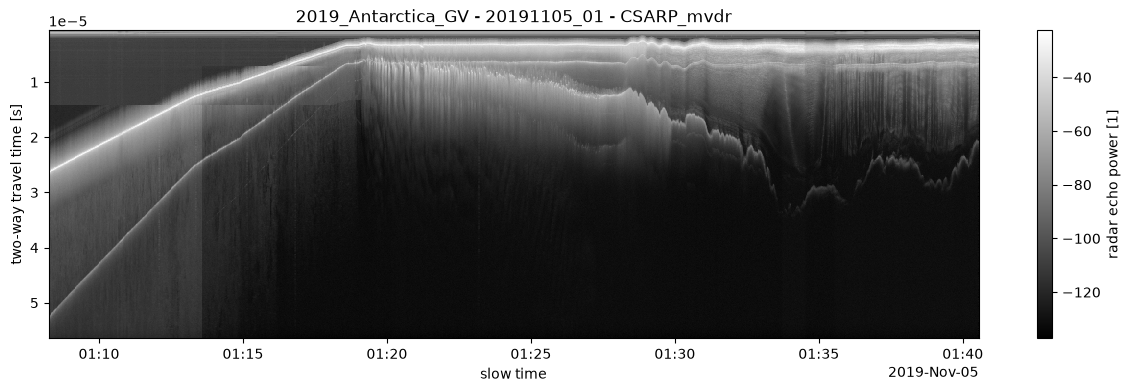
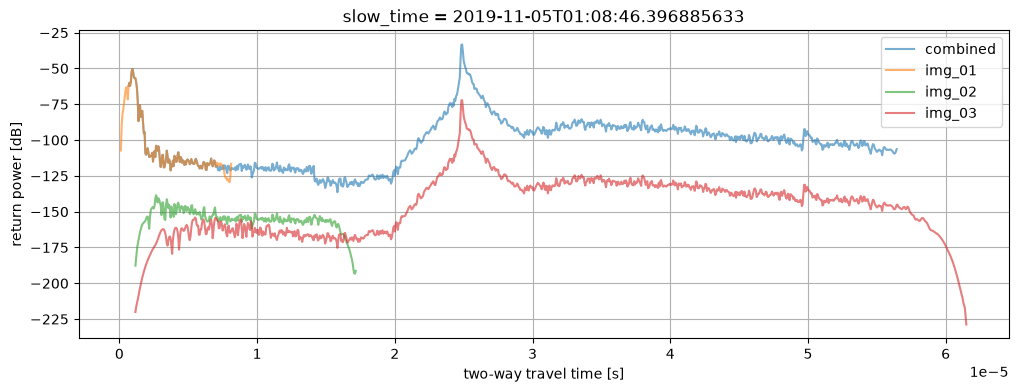
Loading individual images
The allow_unlisted_products flag can also be used to enable loading individual “images”.
ds_images = {}
for img_idx in range(5):
    try:
        if img_idx == 0:
            img_idx = None
            img_key = "combined"
        else:
            img_key = f"img_{img_idx:02d}"

        ds_images[img_key] = opr.load_frame(stac_items.iloc[0], data_product="CSARP_qlook", image=img_idx, allow_unlisted_products=True)
    except FileNotFoundError:
        break

slow_time_idx = 100

fig, ax = plt.subplots(figsize=(12, 4))

for img_key, ds_img in ds_images.items():
    img = 10*np.log10(np.abs(ds_img['Data'].isel(slow_time=slow_time_idx)))
    img.plot(x='twtt', ax=ax, label=img_key, alpha=0.6)

ax.legend()
ax.grid()
ax.set_ylabel("return power [dB]")
plt.show()